
Quick Answer: Hell Let Loose: Vietnam Not Working
If Hell Let Loose: Vietnam is not working on your PC—whether it won’t start, crashes on launch, freezes on loading screens, or shows connection errors—the issue is usually caused by corrupted game files, outdated drivers, unstable network routing, or Unreal Engine 5 performance conflicts. Most players can fix these problems by verifying game files, updating GPU drivers, repairing Easy Anti-Cheat, and optimizing system and network settings.
For persistent lag or connection instability, improving routing stability with tools like LagoFast Game Booster can also help reduce ping spikes and disconnections in large 50v50 matches.
Introduction
Hell Let Loose: Vietnam delivers massive-scale tactical warfare built on Unreal Engine 5, but that same scale also makes it sensitive to performance and network issues. Many players encounter problems such as the game failing to launch, crashing shortly after startup, getting stuck on loading screens, or being unable to connect to servers.
These issues can feel frustrating because they often appear without clear error messages, leaving players stuck before they even reach the battlefield. The good news is that most of these problems are not permanent and can be resolved with structured troubleshooting. This guide breaks down the most effective fixes across launch issues, crashes, freezing, and connectivity errors, along with optimization tips to improve overall stability and performance.

- ✅ Reduce Lag and High Ping.
✅ Boost FPS at the Same Time.
✅ Support 2000+ Popular Online Games.
✅ Change Server without Latency.
✅ Boost Game Loading Speed.
Part 1: Hell Let Loose: Vietnam Fails to Launch / Won't Launch On PC
Part 2: Hell Let Loose: Vietnam Crashes at Startup/ Keeps Crashing
Part 3: Hell Let Loose: Vietnam Stuck on Loading Screen / Freezing
Part 4: Hell Let Loose: Vietnam Connection Issues / Can't Find Servers
Part 5: Advanced Technical Fixes for UE5 Stability
Part 6: How to Enhance Your Game Experience with LagoFast Game Booster
Part 1: Hell Let Loose: Vietnam Fails to Launch / Won't Launch On PC
The jungle of Vietnam is unforgiving, and so too can be the launch process for Hell Let Loose: Vietnam. Many players, eager to dive into the brutal 50v50 combat, find themselves staring at a desktop instead of the main menu. This issue often stems from fundamental system conflicts or corrupted game data.
Verify Game Files Integrity
Corrupted or missing game files are the most common culprits for launch failures. Steam's verification tool is your first line of defense. To do this, open your Steam Library, right-click on Hell Let Loose: Vietnam, select Properties, go to the Installed Files tab, and click Verify integrity of game files. This process will scan your installation and automatically redownload any damaged or missing components. It's a simple yet incredibly effective fix that often resolves a multitude of launch-related headaches.
Update Graphics Drivers
Outdated graphics drivers are a frequent cause of game launch failures, particularly for new titles utilizing advanced rendering technologies like those in Unreal Engine 5. Ensure your NVIDIA, AMD, or Intel graphics drivers are updated to the very latest version. Visit your GPU manufacturer's official website, download the most recent drivers for your specific card, and perform a clean installation. This ensures your system can properly interpret and render the game's visuals, preventing crashes before the game even starts.
Run as Administrator
Sometimes, games require elevated permissions to access certain system resources. Right-click on the Hell Let Loose: Vietnam executable (or its shortcut) and select Run as administrator. You can also set this permanently by going to Properties > Compatibility and checking the "Run this program as an administrator" box. This can resolve issues where the game or its anti-cheat component is blocked from accessing necessary files or system processes.
Disable Overlays and Background Applications
Game overlays (like Steam Overlay, Discord Overlay, GeForce Experience, MSI Afterburner) and other background applications can interfere with game launches, especially for demanding titles. Temporarily disable all overlays and close any unnecessary background programs before launching Hell Let Loose: Vietnam. This reduces potential conflicts and frees up system resources, giving the game a cleaner environment to start in.
Part 2: Hell Let Loose: Vietnam Crashes at Startup/ Keeps Crashing
Few things are more frustrating than a game that crashes repeatedly, especially when you're trying to get into the thick of battle. Hell Let Loose: Vietnam, with its large-scale battles and detailed environments, can be demanding on your system. Crashes often point to resource limitations, software conflicts, or stability issues within the game engine itself.
Check System Requirements
While Hell Let Loose: Vietnam is a new title, it's built on Unreal Engine 5, which can be resource-intensive. Double-check that your PC meets or ideally exceeds the minimum and recommended system requirements. Pay close attention to RAM, CPU, and GPU specifications. If your hardware is borderline, crashes are more likely, especially during intense moments or map loading.
Update Windows and DirectX
An outdated Windows operating system or DirectX version can lead to instability and crashes. Ensure your Windows is fully updated via Windows Update. Also, verify that your DirectX installation is current. You can often force a DirectX update by running the DirectX End-User Runtime Web Installer from Microsoft's official website.
Adjust In-Game Graphics Settings
If the game launches but crashes shortly after, your graphics settings might be too high for your hardware. Start the game in a safe mode (if available) or quickly navigate to the graphics options and lower settings such as texture quality, shadow quality, and anti-aliasing. Experiment with different settings to find a stable configuration that balances performance and visual fidelity.
Reinstall Easy Anti-Cheat (EAC)
Easy Anti-Cheat (EAC) is crucial for Hell Let Loose: Vietnam's integrity, but it can also be a source of crashes if corrupted. Navigate to the EAC folder within your game directory (usually Steam\steamapps\common\Hell Let Loose Vietnam\EasyAntiCheat). Run the EasyAntiCheat_Setup.exe file and select "Repair Service". If that doesn't work, try uninstalling and then reinstalling EAC. This can often resolve crashes related to anti-cheat conflicts.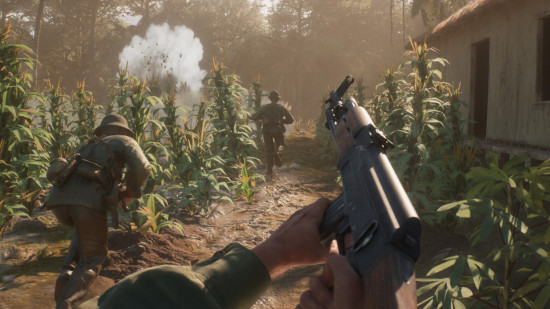
Part 3: Hell Let Loose: Vietnam Stuck on Loading Screen / Freezing
Getting stuck on a loading screen or experiencing freezes can be particularly vexing, as it often means you're tantalizingly close to the action but unable to join. These issues are frequently tied to asset loading, shader compilation, or disk I/O performance, especially with the demands of Unreal Engine 5.
Clear Shader Caches
Unreal Engine 5 games heavily rely on shader caches. A corrupted or outdated shader cache can cause infinite loading screens or freezes. To clear it, search for Disk Cleanup in Windows, select your C: drive, and ensure DirectX Shader Cache is checked before clicking OK. For NVIDIA users, you can also clear the shader cache through the NVIDIA Control Panel under Manage 3D settings > Shader Cache Size > Clear. After clearing, the game will rebuild shaders, which might take a moment on the first launch but should resolve the issue.
Move Game to SSD
If you're still running Hell Let Loose: Vietnam from a traditional Hard Disk Drive (HDD), long loading times and freezes are almost inevitable. Modern games, especially those built on Unreal Engine 5 with high-resolution assets, are designed for Solid State Drives (SSDs). Moving the game to an SSD (preferably an NVMe SSD) will drastically reduce loading times and eliminate many loading-related freezes.
Increase Virtual Memory (Page File)
If your system has limited RAM, the game might struggle to load all necessary assets, leading to freezes. Increasing your virtual memory (page file) can provide a temporary solution. Go to System Properties > Advanced > Performance Settings > Advanced > Virtual Memory > Change. Uncheck "Automatically manage paging file size" and set a custom size, typically 1.5 to 2 times your physical RAM. This gives your system more breathing room for demanding games.
Disable Fullscreen Optimizations
Fullscreen optimizations in Windows can sometimes interfere with games, causing loading issues. Right-click on the Hell Let Loose: Vietnam executable, go to Properties > Compatibility, and check the box for "Disable fullscreen optimizations." This can sometimes resolve unexpected freezes or black screens during loading.
Part 4: Hell Let Loose: Vietnam Connection Issues / Can't Find Servers
Hell Let Loose: Vietnam is a multiplayer-focused title, meaning a stable and efficient internet connection is paramount. Connection issues can manifest as an inability to find servers, high ping, frequent disconnections, or being kicked from matches. The dense jungle environments and large player counts demand robust network performance.
Restart Router and Modem
A classic fix for any network issue. Power cycle your router and modem by unplugging them for 30 seconds, then plugging them back in. This can clear up network congestion and refresh your connection to your Internet Service Provider (ISP).
Use a Wired Connection (Ethernet)
Wi-Fi is convenient, but it's inherently less stable and slower than a wired Ethernet connection. For competitive multiplayer games like Hell Let Loose: Vietnam, an Ethernet cable is highly recommended to minimize latency, packet loss, and connection drops.
Check Firewall and Antivirus Settings
Your Windows Firewall or third-party antivirus software might be blocking Hell Let Loose: Vietnam or its Easy Anti-Cheat component from communicating with game servers. Ensure that HLL_Vietnam.exe and EasyAntiCheat.exe are added as exceptions to your firewall and antivirus. Temporarily disabling them for a test can help confirm if they are the cause.
Change DNS Servers
Your ISP's default DNS servers might not be the fastest or most reliable. Switching to public DNS servers like Google DNS (8.8.8.8 and 8.8.4.4) or Cloudflare DNS (1.1.1.1 and 1.0.0.1) can sometimes improve routing and reduce connection issues. This is done through your network adapter settings in Windows.
Part 5: Advanced Technical Fixes for UE5 Stability
As Hell Let Loose: Vietnam leverages Unreal Engine 5, some issues might be specific to this powerful yet demanding engine. These advanced fixes delve deeper into system configurations to optimize performance and stability.
Disable Unreal Engine 5's Nanite and Lumen (If Applicable)
Unreal Engine 5's Nanite (virtualized geometry) and Lumen (global illumination) are cutting-edge technologies that can be very demanding. While Hell Let Loose: Vietnam might not expose these settings directly, if you experience severe performance issues or crashes, check for any in-game options that relate to advanced geometry or lighting. Disabling them, if available, can significantly improve stability on less powerful hardware. Alternatively, some users might find success by adding -dx11 to their Steam launch options, forcing the game to run on DirectX 11 instead of DirectX 12, which can sometimes be more stable for certain hardware configurations.
Adjust Power Plan Settings
Ensure your Windows power plan is set to "High Performance" or "Ultimate Performance." Go to Control Panel > Hardware and Sound > Power Options. This prevents your CPU and GPU from throttling down during gameplay, ensuring they deliver maximum performance. For laptops, ensure you're plugged into power while gaming.
Clear Temp Files
Accumulated temporary files can sometimes interfere with game performance and stability. Press Windows Key + R, type %temp%, and press Enter. Select all files and delete them. Do the same for temp (without the percentage signs). This cleans up unnecessary clutter that might be causing conflicts.
Update BIOS/UEFI
An outdated BIOS/UEFI can sometimes cause compatibility issues with new hardware or software, including games built on modern engines. Visit your motherboard manufacturer's website to check for the latest BIOS/UEFI updates. Proceed with caution, as a failed BIOS update can brick your motherboard.
Part 6: How to Enhance Your Game Experience with LagoFast Game Booster
Even after meticulously applying all the manual fixes, network performance can remain a bottleneck, especially in a fast-paced, large-scale multiplayer game like Hell Let Loose: Vietnam. High ping, packet loss, and unstable connections can turn a tactical advantage into a frustrating defeat. This is where LagoFast Game Booster becomes an invaluable tool for any serious PC gamer.
LagoFast is a specialized network optimization tool designed to provide a stable, low-latency connection by intelligently routing your game traffic through optimized pathways. It bypasses congested public internet nodes, which are often the root cause of lag spikes and disconnections. For Hell Let Loose: Vietnam, where every shot and every callout matters, a reliable connection is not just a luxury—it's a necessity.
How to Use LagoFast Game Booster
Step 1: Click the Free Trial button to download and install LagoFast.
Step 2: After installation, search "Hell Let Loose: Vietnam" in the search bar and select the game.
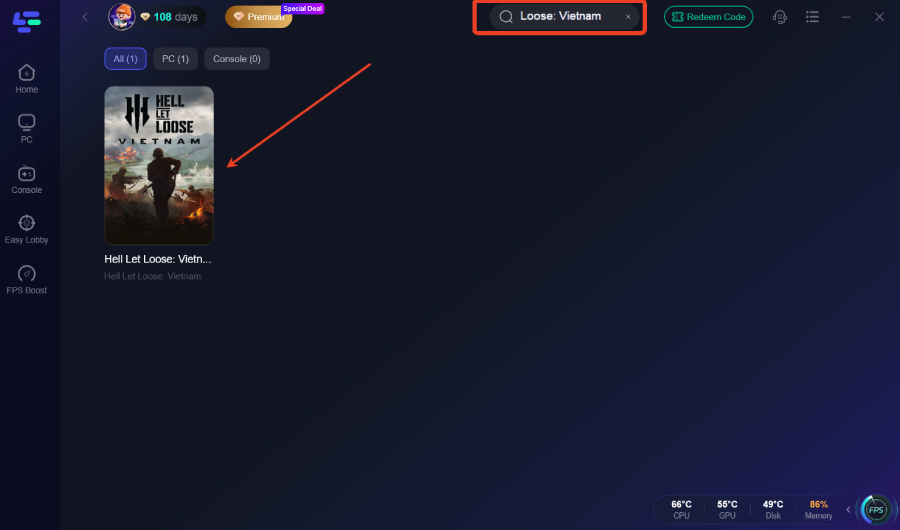
Step 3: Choose your preferred server node and click "Smart Boost" to start optimizing.
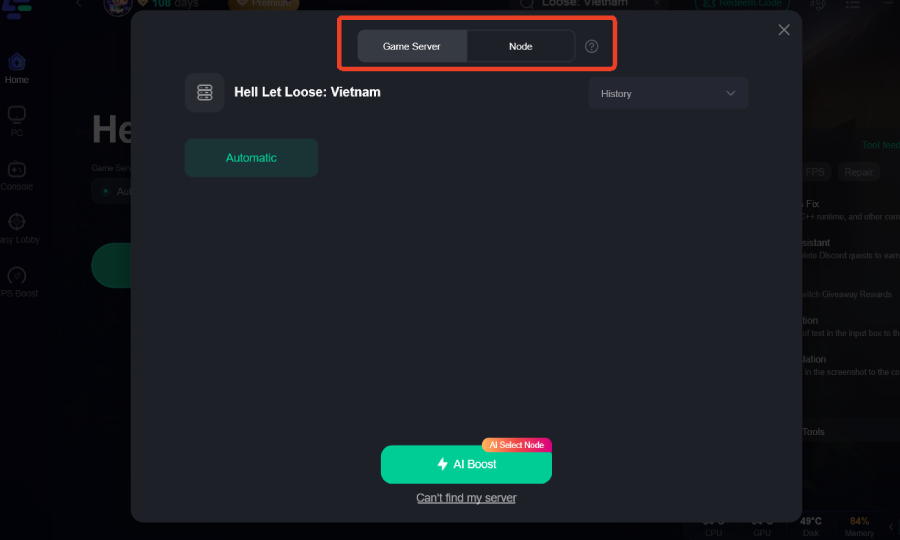
Step 4: Launch your game and enjoy smooth, optimized gameplay with lower ping and no stutter.
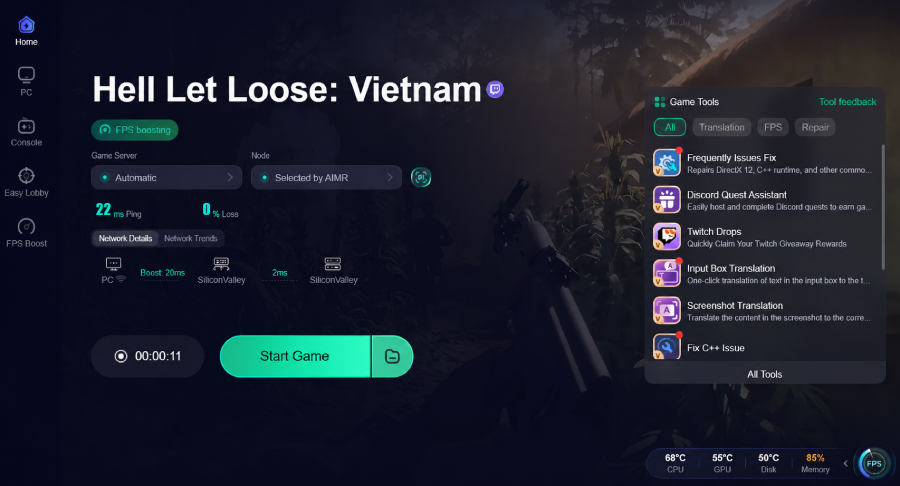
By integrating LagoFast into your gaming routine, you effectively eliminate network instability as a variable, allowing you to perform at your peak without being held back by technical limitations.
Part 7: FAQs
Q1: Why is Hell Let Loose: Vietnam so demanding on my PC?
A1: Hell Let Loose: Vietnam is built on Unreal Engine 5, which utilizes advanced graphics technologies like Nanite and Lumen. These technologies, combined with large-scale 50v50 battles and highly detailed environments, make the game very resource-intensive, especially on the CPU and GPU.
Q2: Is Hell Let Loose: Vietnam a standalone game or DLC?
A2: Hell Let Loose: Vietnam is a standalone title, the first new game in the Hell Let Loose franchise. It is not a DLC for the original Hell Let Loose.
Q3: What is Easy Anti-Cheat (EAC) and why is it important?
A3: Easy Anti-Cheat (EAC) is a third-party anti-cheat service used by many online games, including Hell Let Loose: Vietnam. It's crucial for detecting and preventing cheating, ensuring a fair gameplay environment for all players. The game will not launch without EAC running correctly.
Q4: Can I play Hell Let Loose: Vietnam offline?
A4: No, Hell Let Loose: Vietnam is an online-only multiplayer game. It requires a persistent internet connection to play, as all game modes are designed for large-scale player versus player combat.
Q5: My game crashes when I try to change settings. What should I do?
A5: If the game crashes when changing settings, try deleting your game's configuration files. These are usually located in Documents\My Games\HellLetLooseVietnam\Saved\Config\WindowsNoEditor. Delete the files in this folder, then verify your game files through Steam. The game will regenerate default config files on next launch, allowing you to adjust settings more carefully.
Q6: Why do I get a "Lost Connection to Host" error even with good internet?
A6: This error, especially in a game like Hell Let Loose: Vietnam, can often be caused by server-side issues, temporary network routing problems, or strict firewall settings. Even with good internet, if the path to the game server is congested, you might get disconnected. Using a game booster like LagoFast can often resolve these routing issues.
Key Takeaways
Experiencing issues with Hell Let Loose: Vietnam can be incredibly frustrating, pulling you away from the intense, tactical combat that defines the game. While many problems can be resolved through diligent troubleshooting—from verifying game files and updating drivers to optimizing system settings—the underlying cause is often a complex interplay of hardware, software, and network factors. For PC gamers seeking a truly seamless and optimized experience, especially when dealing with connection-related woes, LagoFast Game Booster stands out as a powerful solution. By providing a stable, low-latency connection, it ensures you spend less time troubleshooting and more time dominating the battlefields of Vietnam. Don't let technical glitches dictate your combat effectiveness; equip yourself with the right solutions and dive back into the fight. Download LagoFast today and ensure your deployment is always smooth.

Boost Your Game with LagoFast for Epic Speed
Play harder, faster. LagoFast game booster eliminates stutter and lags on PC, mobile, or Mac—win every match!
Quickly Reduce Game Lag and Ping!
Boost FPS for Smoother Gameplay!