
Honor of Kings: World PC Alpha Test runs from May 21 to May 27. If you can’t connect to the server, don’t panic. Since this is still an alpha test, server errors, login failures, long loading, and random disconnects are normal during the test period.

- ✅ Lower ping and fewer disconnects.
- ✅ More FPS and better PC performance.
- ✅ Support for 3000+ games.
- ✅ Stable connections and region switching.
Why You Can’t Connect to Honor of Kings: World Server
The most common reasons are simple:
The alpha test server is not open yet or is under maintenance.
Your account does not have alpha test access.
Too many players are trying to log in at the same time.
You downloaded the wrong client.
Your network route to the test server is unstable.
Your VPN, proxy, or firewall is blocking the connection.
If the game opens but you can’t enter the server, it does not always mean your PC is broken. Most of the time, the issue is related to the test server or your connection route.
Quick Fix: Improve Your Connection Route with LagoFast
If the alpha server is open, your account has access, and your client is correct, then the problem may be your route to the Honor of Kings: World server.
This is common when you can open websites normally but the game still shows connection errors, login timeout, stuck loading, or disconnects.
LagoFast can help optimize the route to the Honor of Kings: World PC Alpha Test server and reduce connection issues caused by unstable routing.
Step 1: Download and open LagoFast.
Step 2: Search for Honor of Kings: World.
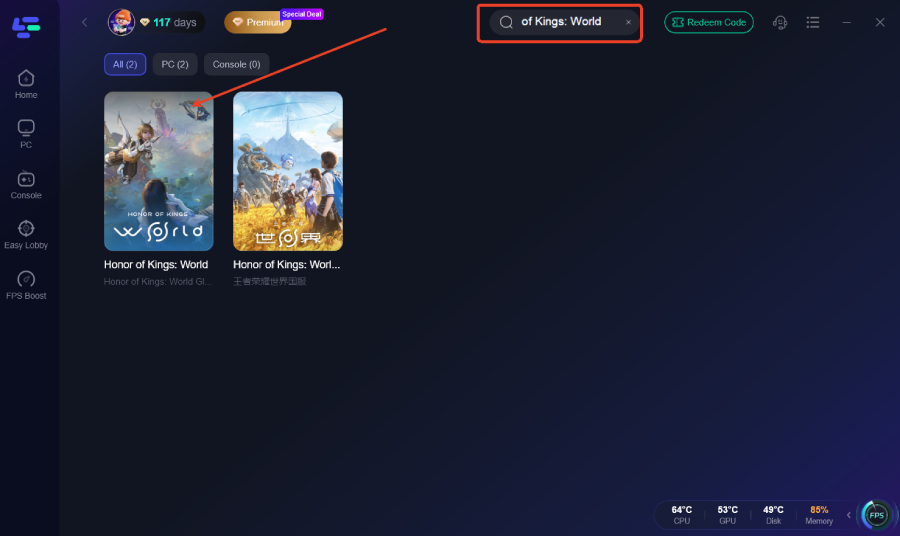
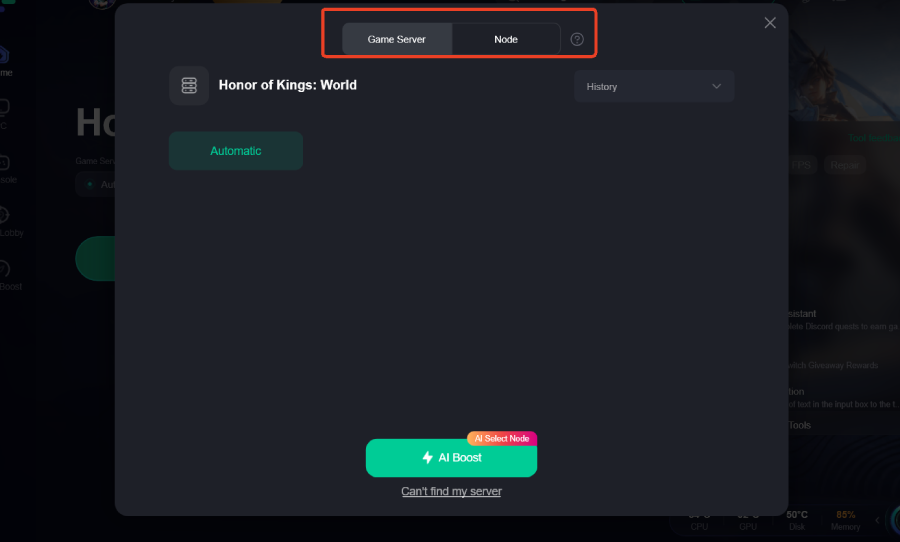
Step 3: Choose the route for the PC alpha test server.
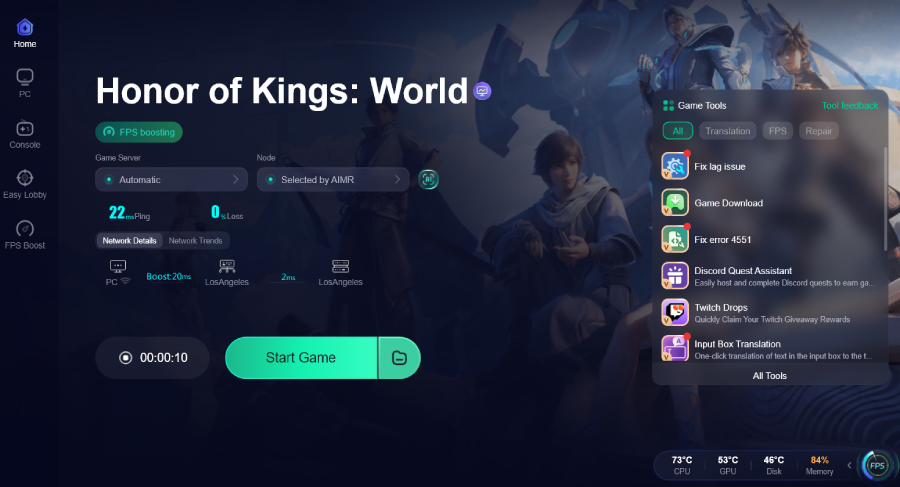
Step 4: Click boost and launch the game.
Do not choose the CN server route if you are trying to play the PC alpha test.
Fix 1: Make Sure the Alpha Test Is Live
Honor of Kings: World PC Alpha Test is available from May 21 to May 27.
If you try to enter the game before the test starts or after it ends, the server may not respond. You may see errors like “failed to connect to server,” “server not responding,” “network error,” or “login timeout.”
In this case, there is nothing to fix on your PC. You just need to wait until the server is open.
Fix 2: Make Sure You Installed the Correct Client
You may have the wrong client if:
The game asks for QQ or WeChat login.
The launcher is fully Chinese.
The game requires mainland China real-name verification.
The server list only shows Chinese servers.
You downloaded the game from a CN page or unofficial mirror.
What to do:
Delete unofficial installers.
Do not use random download links from forums.
Do not use the CN client for the PC Alpha Test.
Install the client from the same platform where you received test access.
Log in with the same account that received access.
If your client and account do not match, the game may launch but still fail to connect.
Fix 3: Check Whether Your Account Has Test Access
Honor of Kings: World PC Alpha Test is not a full public release. Downloading the client does not always mean you can enter the server.
You need to confirm that your account was selected for the test.
If You Registered on the Official Test Page
Do this:
Go back to the official Honor of Kings: World test page.
Log in with the same account you used to register.
Check whether your application was approved.
If your application is still pending or not selected, you cannot enter the server yet.
If You Joined Through Steam
Do this:
Open Steam.
Go to your Library.
Search for Honor of Kings: World.
Check whether the alpha test client appears in your Library.
If you only see the store page, your account may not have test access.
If You Received an Invitation Email
Do this:
Open the invitation email.
Check whether it gives you a download link, test code, or activation steps.
Use the same email or platform account that received the invitation.
If there is a test key, redeem it before launching the game.
Fix 4: Restart the Game and Launcher
If the server is open but you still can’t connect, restart everything first.
Close the game.
Close the launcher completely.
Open Task Manager and end any remaining game or launcher process.
Wait one or two minutes.
Run the launcher again.
Start the game.
This can fix stuck login sessions, especially when the server is overloaded.
Fix 5: Update or Repair the Game Client
If your client version is outdated, the server may reject the connection.
Use this fix if:
You are stuck on loading.
The server list does not load.
The game crashes after server selection.
You disconnect right after login.
The launcher says files are missing.
What to do:
Open the launcher.
Check for updates.
Let the update finish completely.
Use the repair or verify option if available.
Restart the launcher.
Try entering the server again.
Do not launch the game while the launcher is still updating or verifying files.
Fix 6: Check Whether the Server Is Full
Alpha test servers are often unstable. Even if your account and client are correct, you may still fail to enter during peak hours.
Server overload usually looks like this:
You can log in but cannot enter the world.
The server list loads slowly.
You get stuck after choosing a character.
The queue does not move.
The game disconnects during loading.
Many players are reporting the same issue.
What to do:
Wait 10 to 20 minutes.
Restart the launcher.
Try again outside peak hours.
Do not keep clicking the login button.
If many players have the same problem, it is probably a server-side issue. Your PC is not the problem.
Fix 7: Turn Off VPN, Proxy, WARP, or Other Network Tools
Random VPNs can break game login. They may help open websites, but they can also cause region mismatch, high ping, packet loss, and login failure.
What to do:
Turn off VPN.
Turn off proxy.
Turn off WARP.
Close other game boosters.
Restart the launcher.
Test the game again.
Do not use several network tools at the same time. It usually makes the connection worse.
Fix 8: Allow the Game Through Firewall
If the launcher opens but the game cannot connect, Windows Firewall may be blocking the game.
What to do:
Open Windows Security.
Go to Firewall & network protection.
Click Allow an app through firewall.
Add the Honor of Kings: World launcher.
Add the game executable.
Allow both Private and Public networks.
Save the changes.
Restart the launcher.
If you use third-party antivirus software, also check whether it blocked or quarantined the launcher.
Only allow the game if you downloaded it from the official test source.
Fix 9: Reinstall Only If the Client Is Wrong or Broken
Do not reinstall the game as your first fix. Reinstalling will not help if the server is full, the test is closed, or your account has no access.
Only reinstall if:
You installed the CN client by mistake.
You downloaded the client from an unofficial source.
The launcher cannot update.
Repair fails.
Game files are missing.
The game crashes before login every time.
After reinstalling, download the client from the same platform where your PC Alpha Test access was granted.
Final Answer
If you can’t connect to the Honor of Kings: World server, first check whether the PC Alpha Test is live from May 21 to May 27. Then make sure your account has test access and that you installed the correct non-CN alpha client.
If your account and client are correct, the problem is usually caused by server overload or unstable routing. Restart the launcher, repair the client, turn off random VPN tools, and use LagoFast to optimize the route to the Honor of Kings: World PC Alpha Test server.

Boost Your Game with LagoFast for Epic Speed
Play harder, faster. LagoFast game booster eliminates stutter and lags on PC, mobile, or Mac—win every match!
Quickly Reduce Game Lag and Ping!
Boost FPS for Smoother Gameplay!